
Suddenly wanted to start a blog again (after, what? 3 times where I set it up but didn’t actually write anything).
But instead of using e.g. WordPress like in the good old times, this time I decided to go “static”. I guess nowadays I prefer simplicity, having seen way many sites with way too much (client-side and server-side) JavaScript and dynamic elements (like come on, how on earth does a wiki page use up 1 GB of RAM???)
I don’t want a comment section, and I don’t want any analytics or similar things. I just want a place to document some of my thoughts. Maybe a view count and like button would not be too bad though.
By the way, instead of writing this here, I really should be doing other things (leetcode, preparing presentation etc). But I am a master of procrastination, so here I was yesterday, scrolling through NASA archive to find a good background picture for this blog.
Enough on my state of mind, let us start with the actual topic.
Choice of “stack”#
Not sure if it can be really called “stack”, but nevertheless there were a few options to choose from. For example, I saw someone using Jekyll, Hexo. A lot of people use WordPress too. But after some digging around (primarily consisted of asking ChatGPT), it seems that Hugo is a good option if you want a static site (being Go-based and all). Albeit apparently Jekyll has easier integration with GitHub pages.
The reason to choose GitHub pages is simple: I don’t intend to pay or maintain yet another server, and GitHub pages is free. Yes, you only get a subdomain under github.io but that is not a big deal for me. (and afaik you can bring a custom domain to be used with GitHub pages.)
After settling on Hugo, GitHub pages, I decided I also want to use a Hugo theme directly. Not really interested in writing HTML and CSS just for this. My main source was just the official repo and a list from ChatGPT XD . Blowfish stood out because it seemed customizable enough but not too overengineered. And it has built-in search function etc.
One of the reasons I wanted static instead of, say, WordPress was that I wanted the flexibility in choosing the tool for writing while keeping integration efforts reasonable. For example, writing in Obsidian markdown and then copying everything to WordPress editor is not desired. Right now, I am using Obsidian, because apparently this is what a lot of people use at the moment so I thought I would try it out. But it does bug me a bit that it is a proprietary software, even if it is free for basic personal use.
Integration#
One of my major targets was an easy workflow. That in particular includes inserting pictures in an article. I don’t want to have to manually push a picture to a certain location and then manually reference it in the markdown file. Obsidian lets you just pasting the picture inline and it handles where to put the actual file and the referencing etc. I was very pleased as I found that it also lets you configure the location and the style of the link (relative or absolute):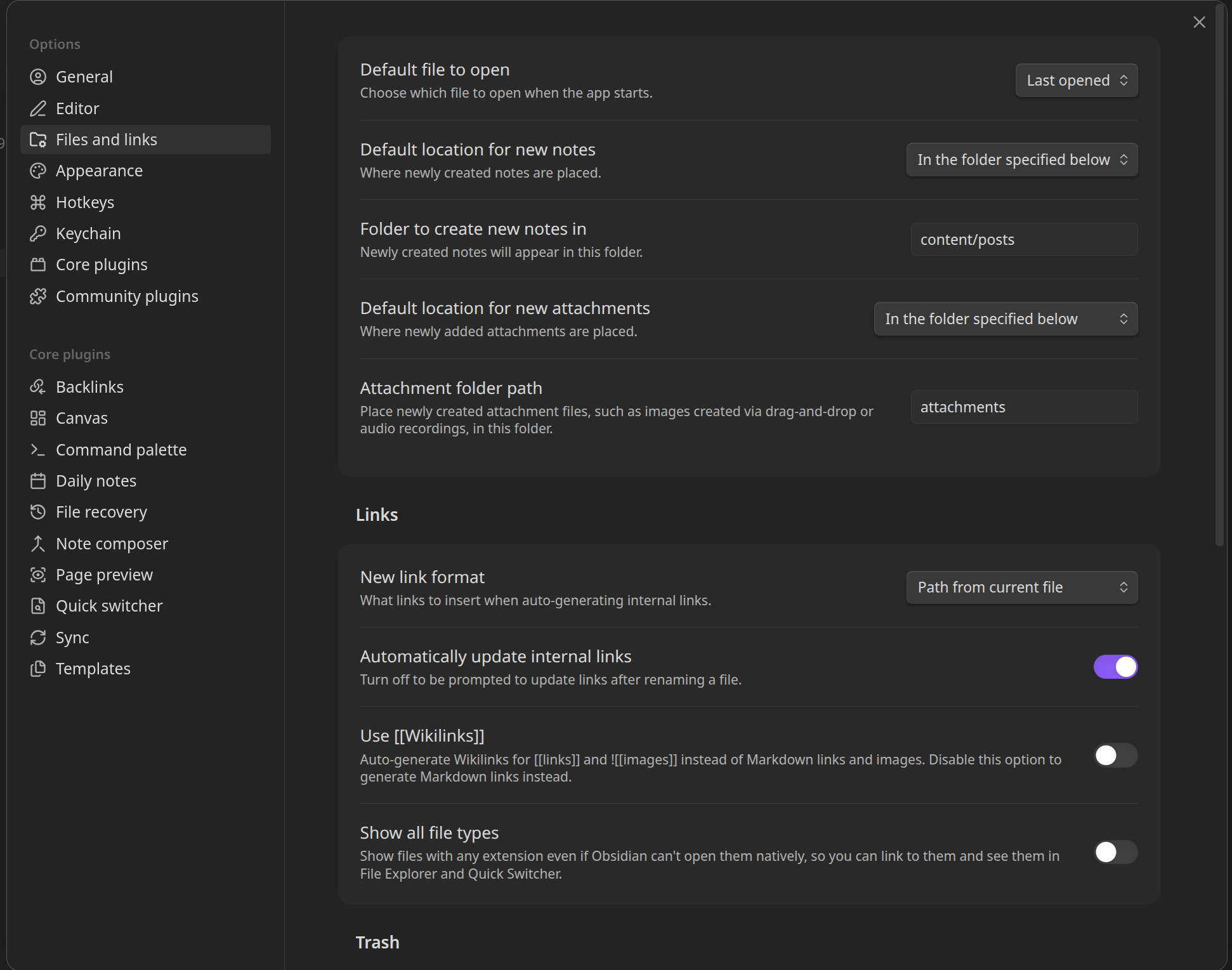
But to integrate it with Hugo, it required some work. As I am not familiar with Hugo and its configuration system, it took me quite a well to get it to work correctly. The first problem I had to solve was that Hugo wants you to put the files in the static/ folder. But Hugo does not, by default, let you reference the file using static/... . For example, if you have static/images/a.jpg, you would have to use /images/a.jpg from markdown file to have the picture shown correctly on the Hugo-regenerated site.
However, Obsidian does not recognize /images/a.jpg (note that I am using the git repo folder as the Obsidian vault), because from its perspective, it really should be static/images/a,jpg. And that is what Obsidian will automatically write in the markdown, if you have the default file location set to static/images and link to path from vault root.
After some searching, I came across this page which explains that using the module.mounts lets you use an “alias”. So I created attachments/ in the repo/vault root (and set Obsidian to use it as the file location), and added this to my module.toml which was inside config/_default and empty (after I had followed Blowfish’s instructions of copying config files):
[[module.mounts]]
source = 'attachments'
target = 'static/attachments'
But it did not work.
Any request to site.com/attachments/* failed with 404. I tried restarting everything, putting [module] on top of it. I even followed ChatGPT’s suggestion of installing Go and creating a go module because “hugo modules are go modules”. It was not until I had spent way too much time (more than I spent on actual relevant work) when I realized that the problem was the fact that I put the config snippet inside module.toml and it really should be inside hugo.toml (also inside config/_default).
You see, I assumed the files were purely for organization and they are equivalent to writing everything inside one config file (similar to how I always treated the nginx configs). But at least in this case, my assumption was not true. Note that I still do not know how Hugo config is supposed to work, I just found out that putting it in hugo.toml works, and left it at that (I just want to write a blog).
Now it is no longer 404 for existing files, but any newly added files require a restart of the Hugo dev server. The cause is I did not add
disableWatch = falsewhich meant that updates in the folder will not be updated with respect to the mount.
The final version inside hugo.toml is:
[[module.mounts]]
disableWatch = false
source = 'attachments'
target = 'static/attachments'
Another small problem is that Obsidian does not put a starting / for links. After all, attachments is not located at the file system root. But from Hugo’s view, attachments very much is directly inside the root (being mapped to static and all). So what I do is just set Obsidian to use relative path, and somehow Hugo resolves it correctly (kinda makes sense, because the relative path ../../attachments does lead to the correct location in file system, but that is not the static/attachments, but if it works then it works).
Now, to write a blog post, I just open Obsidian, add a new note, click a button to insert a template (that contains the properties header that Hugo requires), and start writing & pasting screenshots. After I am done, I just do git add . , git commit and git push. Then the GitHub workflow (taken from Hugo docs and modified to use newer action versions) handles the automatic deployment. For now it seems to work just fine.